Damaris X | Problem | The engineer | A Monday | Playbook | carafe | Cellar door | skilldecant | Fleet operator | Status | Licensing | | Style: plain, human style


A note before you start: this page is for people, but we know you'll hand it to your agent anyway. So it's plain HTML, and there is a plain-text copy at /llms.txt. Hello, agent.

Damaris X / agent-ready infrastructure for small companies

What the best AI teams build for themselves, installed in a ten-person company.

An always-on agent for each person, one library of skills that every agent shares, and the machines kept running, set up by an engineer who then works on your workflows. The most AI-native teams build this with their own platform engineers. A ten-person company has none, so we bring it.

How it works | Where it stands

[in daily use] The skills already run every day in two small companies we operate. [early] carafe is a proof of concept, the Fleet operator is lab-tested, and the box is a plan.

a ten-person office           illustrative

  ana     ben     chen    dia     eli
  carafe  carafe  carafe  carafe  carafe
  fay     gus     hana    ivo     jun
  carafe  carafe  carafe  carafe  carafe

a Mac station per security boundary

  [front desk]  [finance]  [back office]
  [audit]  [owner]

+---------------------------------------+
| skills                                |
| finance · permits · sales · …         |
+---------------------------------------+
| carafe box                            |
| the small computer that keeps it all  |
| running                               |
+---------------------------------------+

The problem

Big companies get an engineer on site. Small companies can't pay for one.

AI labs send engineers to their big customers, to sit with a team until the agents do real work. That is how agents earn their keep. At ten people, nobody pays for that.

The work is specific

Someone has to sit with the team.

Agents pay off on a company's own workflows: its portals, its boards, its books. Each one has to be found, taught and checked.

The machines must stay on

Agents stop when the laptop closes.

Someone has to keep a machine awake, signed in and patched for every person, and fix it from afar. That is a platform team's job.

Nothing carries over

The next company pays again.

Without reusable skills, each engagement repeats the work. What an engineer built for one office stays there, so the cost never comes down.


How we answer it

An engineer for days, not a platform team for years.

The infrastructure is the same in every office, so the engineer's time goes to the work. The work is kept as skills, so the next company of the same kind starts ahead. That is the aim; pilots will measure it in setup hours, support minutes and tasks done.

Setup

The box goes in.

An engineer, ours or a partner's, plugs the carafe box into the office network, connects the company's sign-in and gives everyone a carafe. Each person signs their agent in themselves.

The engagement

Work, not plumbing.

With the infrastructure already standard, the engineer sits with each team and turns one or two of its workflows into skills.

After

Skills travel.

With the company's permission, and checked for client names and secrets, those skills become a pack for that kind of business. A subscription per person covers monitoring, upgrades and new skills.

The box, the engagement and the subscription are the plan, not yet sold. No prices yet.


What changes for the team [illustrative]

A Monday at a ten-person company, with an agent each.

Nobody learns a new tool. Each person talks to their own agent from the phone, the agent works in the company's systems with the company's skills, and a person approves anything that leaves the building.

The books

"Which invoices are overdue?"

The person who chases payments asks from the train. The agent reads the books, drafts the reminders and posts them for approval. One tap, and it sends them and records what it did.

The portals

"Anything new on our permits?"

The agent checks the government portal in a real browser each morning, updates the job's card on the team's board, and flags what needs a person.

A new hire

"How do we do this here?"

Instead of interrupting a busy colleague, the new person asks the agent, which answers from the same skills everyone else uses. The floor rises for everyone.


The playbook

The playbook we work from.

Y Combinator runs its agents on its own software, one database and a tool registry its teams keep adding to. We built the same habits in our own two companies. Each piece has a counterpart in our kit; some are built, some are still planned.

Left column from Pete Koomen and YC's partners, "Inside YC's AI Playbook", Y Combinator, 2026-05-27. The mapping is our interpretation, not evidence for our kit. Damaris X is not affiliated with or endorsed by Y Combinator.

built in-house, as YC describes itour counterpart, built or planned
teams write their own workflows "as English with prompts", and engineers leave the loopskills, written with the people who do the work
a shared tool registry: 20 tools at first, "more than 350 today", every team adds its ownskilldecant: one library, poured into every agent
a nightly loop that reads agent conversations and improves the skillsdarwin improves a skill on request [nightly loop next]
a multiplayer harness, which "I don't think has been solved well yet by anybody"carafe: an agent per person, all sharing the company's skills; a first step
agents running on everyone's machinesFleet operator and carafe box keep them on
a platform team that builds and runs all of itan engineer for a short engagement

carafe [proof of concept passed]

An always-on agent for each person, driven from the phone.

A carafe is one person's own container: Claude Code, their work folder and the company's skills. They set it up once on one web page, the cellar door, then work from the Claude app. No computer of theirs has to stay on.

carafe / the cellar door

One page to set it up. After that, the phone.
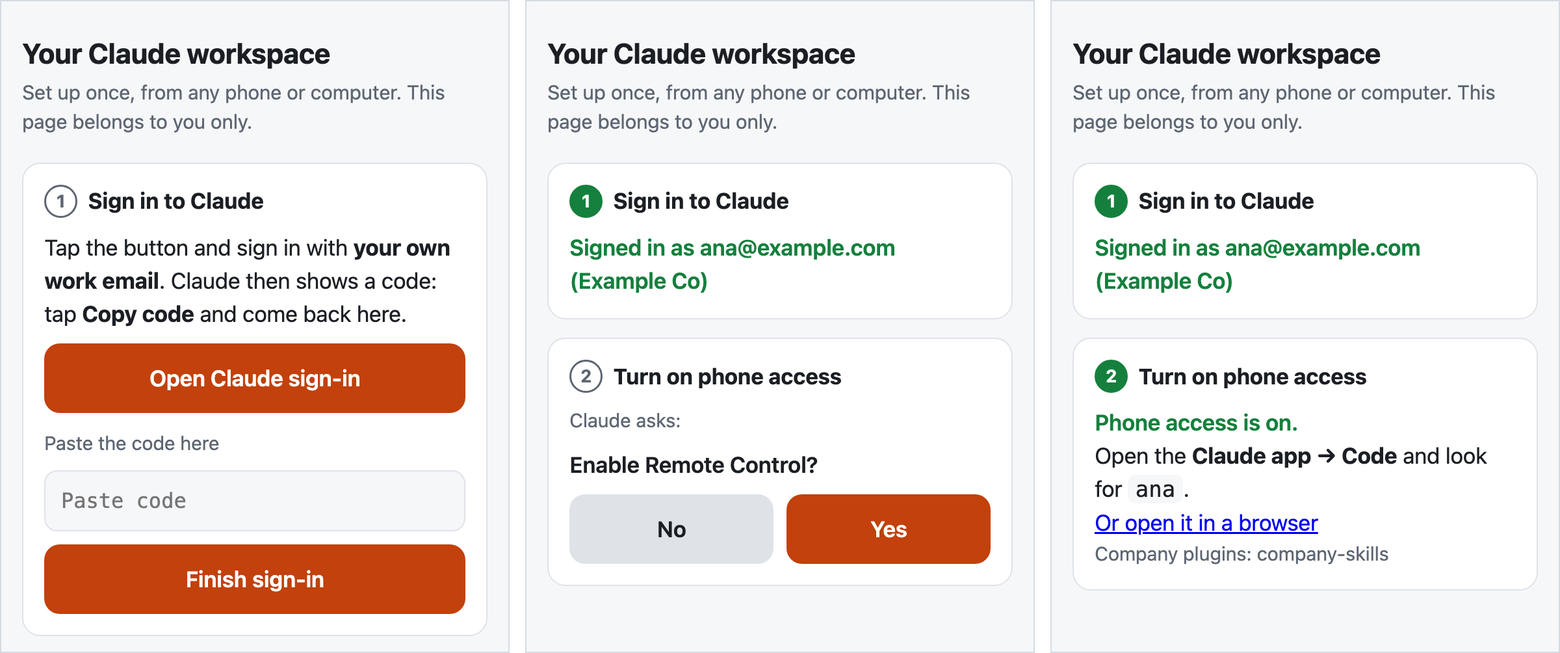
The cellar door on a phone in three states. First: Sign in to Claude, with Open Claude sign-in, a box to paste the code and Finish sign-in. Second: signed in as ana@example.com; Turn on phone access shows Claude's question, Enable Remote Control?, with No and Yes. Third: Phone access is on; open the Claude app, Code, and look for ana.
The cellar door on a phone: sign in, answer Claude's own question, done. Rendered from the proof-of-concept code with example data.

Two rules from the start

Everyone signs in themselves. The sign-in happens in the person's own browser, through Anthropic's flow. The one-time code goes straight into their own carafe; the setup page keeps no copy.

The agent's questions are the person's to answer. "Trust this folder?" and "Enable Remote Control?" are shown verbatim and answered by the person, never for them.


skilldecant [v0.10.0, in daily use]

One library of skills, shared by every agent.

A skill is a SKILL.md and its scripts: a workflow written down so an agent can do it. skilldecant installs a company's skills once and links them into Claude Code, Codex, OpenClaw and Hermes. Release a new version and upgrade once; every agent on the machine reads it.

  • One copy, no drift. By default agents read the installed library through links, so there is nothing to copy and nothing to fall behind.
  • Checked before it travels. A shared collection is linted for client names, secrets and personal paths before it leaves a company.
  • Kept sharp. darwin, alchaincyf's open-source skill optimiser (MIT), scores and improves a skill. Our packaging adds judges from a different model family, scoring each edit blind.
One keg of skills on a cradle, with four taps: OpenClaw, Hermes, Claude Code and Codex. Three pour from the same keg; the Codex tap is shut and tagged OFF until a machine turns it on.
One keg, four taps, left to right: OpenClaw, Hermes, Claude Code, Codex. Codex's stays shut until a machine turns it on.
how a skill reaches every agent
git repo       the skill's source, versioned
   │ installed once, with Homebrew
one library    a single installed copy
   │ linked into each agent
Claude Code    link
Codex          link, once switched on
OpenClaw       link + one config entry
Hermes         link + one config entry
# upgrade once: every agent follows

Fleet operator [lab-tested] + carafe box [plan]

The machines stay on, and a failed check gets its fix.

The Fleet operator runs Fleet, the open-source device manager, and checks that every Mac station is awake, logged in and running its agent. When a check fails and the Mac is online, it runs the configured fix; signing in again stays with the person. The carafe box puts it on a Raspberry Pi 5 in the office, as the company's own control plane.

  • 51 s to notice a stopped agent, in the lab
  • 142 s until it ran again, in the lab
  • 0 people touching the Mac

Measured 2026-10-28 in a kind cluster against a macOS 26.5 VM. Not yet in production.

The full Fleet operator deck

no data centre — the box is yours
The company owns the box and decides who is admin. Support would get in only with its approval, each visit logged.
no open ports — the office network
Claude Code's Remote Control opens no inbound ports, so phones need no public address. Fleet stays on the office LAN.
a Mac per boundary — as many as needed
Front desk, finance, back office, audit and the owner each get their own Mac, sign-ins and keys, so one role's agent is kept away from another's files and accounts. The operator keeps every one running.
remote hands — planned
A 5G backup line, a battery and a KVM, added where a real failure calls for them.

Status

Where each piece stands, without rounding up.

piecewhat it doesstatus
skillsworkflows written so an agent can run them: finance, permits, sales, boards, mail[in daily use] in two small companies we operate
skilldecantinstalls skills once and links them into every agent[v0.10.0] on our own machines
carafean always-on agent per person, from the phone[proof of concept] passed 2026-10-26; HTTPS, company sign-in and provisioning next
Fleet operatorkeeps Mac stations awake, signed in and running[lab-tested] six checks, two companies kept apart; MDM next
carafe boxthe office's own control plane on a Raspberry Pi 5[plan] layout drawn, not built
the engagementan engineer for setup and workflows; skills packs by industry[plan] our own two companies first

Licensing and contact

Free for noncommercial use. Licensed for companies.

For small companies that want agents at work without a platform team, and for the engineers and IT partners who would set them up.

ccheng@ccheng.us | | Write to us

Write for a commercial license, a pilot, or to become a setup partner.

Noncommercial

carafe and skilldecant are licensed under the PolyForm Noncommercial License 1.0.0. Source access on request.

Commercial

Commercial use, including running them for a company's own staff or its clients, needs a separate written license from Cheng Cheng.

Yours stays yours

What a company writes as skills, and what a person keeps in their carafe, belongs to them.

Third parties

darwin is alchaincyf's, under MIT. Fleet, Claude Code, Codex, OpenClaw, Hermes, Homebrew and macOS keep their own terms.

← → to move · Esc to leave